Categories
Events & Trade Shows

The Next Evolution of Media Asset Management

The 4th Annual Chesafest didn’t slow down after its opening session. Vendor Panel 2 took the intellectual temperature in the room and raised it by a few degrees.

The question on the table: Is structured metadata still enough to run a modern media asset management system, or is the rise of vector databases and AI-driven semantic retrieval about to fundamentally reshape how media organizations find, govern, and work with their content?

It sounds like an infrastructure question. It turned out to be a conversation about users, governance, trust, library science, Star Trek, and the surprisingly stubborn challenge of teaching a machine to know what you actually meant.

Moderated by Felix Coats of CHESA, the panel brought together practitioners and vendors from across the MAM ecosystem, a mix of perspectives that produced one of the most substantive conversations of the day.

MEET THE PANEL

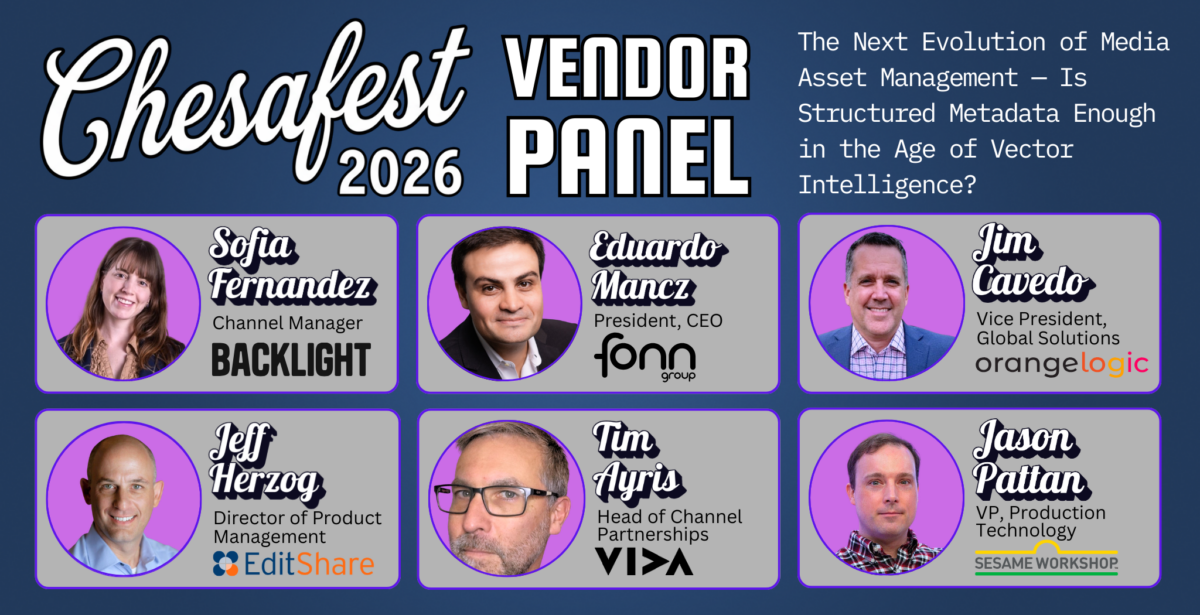
Jason Patton, VP of Production Technology, Sesame Workshop

Jason was a late addition to the panel, he’s a great duck pin bowler. He’s not a vendor; he’s a client, and his real-world perspective on what it actually means to manage a deep archive of beloved children’s content grounded every abstract technology debate in something concrete. His candor was a consistent highlight throughout.

Tim Ayris — Head of Channel Partnerships, VIDA

Tim brought a content operations lens to the conversation. VIDA’s customers use the platform to push and manage content at scale, which means the governance question isn’t theoretical, it’s something they have to solve for every day.

Jeff Herzog — Director of Product Management, EditShare

Jeff came in with a product-depth perspective and a healthy skepticism about the pace of vendor hype versus the pace of actual customer adoption. His point that many customers are skeptical of MAM value, and that AI enhancement layers could change that permanently, set a useful frame early.

Jim Cavedo — VP of Global Solutions, OrangeLogic

OrangeLogic occupies a unique position: a single platform with both DAM and MAM capabilities. Jim brought the agentic AI angle to the conversation and was consistent on one point throughout: the user shouldn’t know or care whether the system is querying a relational database or a vector database. That’s the vendor’s problem to solve.

Sofia Fernandez — Channel Manager, Backlight

Sofia offered clear, precise framing throughout, including one of the best analogies of the session, which involved a coffee machine. She brought a measured view of how the transition from structured to semantic metadata needs to be paced carefully to avoid breaking the users who depend on deterministic search today.

Eduardo Mancz — President and CEO, Fonn Group (Mimir)

Eduardo’s company builds Mimir, a MAM platform well known in the broadcast and media space. He pushed the conversation toward the practical: the complexity of metadata that organizations are already struggling to manage, and the risk of chasing AI capabilities without solving for portability and platform evolution.

Felix Coats — Solutions Consultant, CHESA (Moderator)

Felix opened with a technical level-set that would have impressed a database administrator, covering the core difference between relational and vector databases with enough clarity that the conversation could actually go somewhere. He kept the panel honest and on-topic throughout, and closed with a Star Trek reference that was far more apt than it had any right to be.

THE SETUP: TWO VERY DIFFERENT WAYS OF KNOWING THINGS

Felix opened by drawing a distinction that the industry tends to collapse into buzzwords. A relational database, he explained, is like a well-organized spreadsheet. You know what you’re looking for, you query it precisely, and you get back an exact match. Tomato is a vegetable. Find all videos from 1994. Return assets with active rights for North America.

A vector database works on a completely different principle. It doesn’t retrieve based on declared, structured facts; it retrieves based on similarity and meaning. A cat and a dog aren’t the same animal, but they share enough dimensional proximity in a vector space that a search for “pet” could surface both. It’s powerful for finding things you can’t precisely describe. It’s problematic when you need to know for certain.

The question Felix posed: MAM systems have been built for decades on the declared-truth model; relational databases, structured schemas, deterministic queries. Now users expect systems to understand intent. Can these two models coexist? Or are they philosophically incompatible?

The panel’s answer, reached almost immediately and reinforced throughout: they don’t just coexist, they depend on each other.

“THEY’RE GOING TO HAVE TO LIVE TOGETHER”

Jason Patton got there first, and said it most plainly. A unique identifier, the foundational record that says this asset exists and relates to these other assets, is never going away. That’s relational. That’s structural. That has to be right. But layered on top of that, and running alongside it, is where vector search lives: helping a new generation of users who have grown up talking to chatbots, who don’t know the naming convention, who have a fuzzy idea of what they’re looking for and want the system to meet them there.

“There’s going to be a whole new crop of users whose only experience is talking to a chatbot. They’re going to be like, ‘I don’t know what I want.’ They want the system to come back and say, here are things that are like what we think you’re saying.”

Tim Ayris agreed, adding a dimension specific to VIDA’s user base: the creative users who are doing production work don’t want to learn a taxonomy. They want to type something that approximates what they’re looking for and get results. But the operational users, the ones pushing content, managing distribution, handling rights, need the precision that only a relational database can provide. The same platform has to serve both.

Jeff Herzog came at it from a MAM adoption angle. Many of EditShare’s customers have MAM access but don’t fully use it. They’re skeptical. The value isn’t obvious enough yet. His contention: AI enhancement layers change that equation. Once semantic search makes finding content genuinely effortless, the reluctant users become converts.

“You won’t be able to afford not to use MAM once these enhancement layers come in.”

And Jim Cavedo put the capstone on the opening round with a point that would echo throughout the entire session: the user should never know which database is serving their query. The agentic layer on top of both systems figures that out. The user types a question. The agent decides whether it requires a relational query, a vector search, or some combination of both, and returns a single, coherent result.

“The user has no idea where any of this exists. They just want one pane of glass, one simple chat experience.”-

THE GOVERNANCE PROBLEM: WHEN “GOOD ENOUGH” ISN’T

The second major thread of the session was governance, and this is where the conversation got genuinely uncomfortable in the best way.

Vector databases, by their nature, are not deterministic. They don’t always return the same result for the same query. They can hallucinate connections. They can’t trace their own reasoning the way a relational query can. And in regulated industries (news, legal, medical, and to a significant degree entertainment with its rights and talent participation obligations) that traceability isn’t optional.

Jeff Herzog made the point precisely: a search against a relational database is auditable. You can see exactly why it returned what it returned. A vector search isn’t.

“These vector searches aren’t, by definition, traceable. You can’t see the work in the way that a relational database search is deterministic, there are facts behind it.”

Jim Cavedo went further: if you’re depending on AI to make a rights decision, and you’re challenged on that decision, you need to be able to point to something and say “the data said I could do this.” An unexplainable vector result won’t hold up.

Eduardo Mancz raised a cost dimension that rarely gets discussed: when new models emerge, and they will, you have to re-vectorize your entire dataset. Re-indexing is expensive, time-consuming, and technically demanding. The industry talks constantly about AI capabilities. It talks almost never about the infrastructure cost of maintaining them over time.

“There are going to be needs for new re-indexation of everything, and it has a huge cost associated. Very few discussions about this are actually happening.”

Jason Patton offered a nuanced real-world example from Sesame Workshop. Their archive carries curriculum and educational metadata that human researchers carefully log alongside production content. That metadata is structured, governed, and critical. But it was created by humans who sometimes missed things, especially in content from 30 years ago. Vector-based enrichment can help fill those gaps; but only as a complement to the relational layer, never as a replacement. A human still verifies. The vector layer helps close the coverage gap.

“It’s enrichment, but to a good enough level. And ‘good enough’ only works because there’s a human verifying what’s happening.”

Sofia Fernandez framed the “good enough” debate cleanly: for some industries and some use cases, “good enough” is genuinely acceptable. For others (legal, news, medical) it never will be. The answer isn’t one database winning. It’s designing the system to know which tool to use and when.

Tim Ayris landed the governance thread with a warning: if you haven’t built solid structural metadata foundations today, you’re not going to go back and build them later. Organizations that skip the taxonomy work will leapfrog directly into semantic search, and when semantic breaks, it breaks quietly but confidently, in ways that are very hard to audit or correct.

THE USER EXPERIENCE IMPERATIVE: ONE PANE OF GLASS

A recurring theme throughout the session, and a point of genuine tension, was whether users can or should be trained to understand the difference between structured and semantic search.

Jeff Herzog’s view: yes, to some degree. Users need to understand that a filter (“show me assets with rights valid through 2027”) is a different kind of query than a semantic search (“show me something that feels like a summer afternoon”). Mixing the two requires user literacy.

Jim Cavedo pushed back: users don’t want to be trained. Full stop. The benchmark the industry has to hit is the iPhone. People don’t think about whether their iPhone is making a cellular or WiFi call. They just make the call. The infrastructure decision should be invisible.

Sofia Fernandez offered the most memorable analogy of the session: a coffee machine. The milk is stored in one compartment, the coffee in another. The internal architecture is separate and distinct. But the user presses one button that says “latte” and gets exactly what they want. The underlying complexity is invisible. That’s the design goal for a MAM that bridges relational and vector search; both components working together, neither exposed to the user.

Jason Patton took this a step further, suggesting that the system itself needs to surface explanations when searches fail, not blaming the user, but offering probabilistic guidance on why nothing came back and what might help. An intelligent failure mode is part of the experience.

Jim Cavedo connected this back to the agentic layer: when AI agents are orchestrating queries across multiple databases simultaneously; interpreting intent, routing to the right system, returning results with context, the user doesn’t need to understand any of it. They just need to get the right answer. That’s the world the panel agreed they’re moving toward. The question is how fast.

LIBRARY SCIENCE BECOMES DATA SCIENCE

One of the most intellectually interesting moments came from Terry Melton in the audience, who raised the concept of vector drift and the role of traditional library science. Over time, a vector database’s internal representation of data can drift; the mathematical relationships between items shift as new content is added, as models update, as the index ages. Run the same search twice in a row and you might get different results. That non-determinism is feature for discovery but a bug for governance.

His question: can library science, the discipline that has spent decades thinking about taxonomy, controlled vocabularies, and the principled organization of information, help solve this?

Jim Cavedo’s answer resonated: library science doesn’t disappear. It migrates. It becomes data science. The skills that used to go into building a controlled vocabulary now go into building prompts, tuning embeddings, and designing the logic that drives how an agentic system navigates between retrieval modes. Human judgment doesn’t leave the system, it moves upstream.

“Library science moves into data science. It’s about how you become better at driving the prompts and the values that drive a better result set. And then, as technology gets added to your vector databases, you’re constantly reevaluating those human-led prompts.”

BEYOND SEARCH: WHAT AI ACTUALLY UNLOCKS

The panel didn’t spend all its time on the architecture. Jason Patton pushed the conversation toward what AI-enhanced MAM actually enables beyond better search, and the answers were genuinely exciting.

Sesame Workshop is exploring using semantic analysis for audio description: feeding what the AI knows about a piece of media directly into accessibility workflows, generating descriptions for the visually impaired without human logging. It’s a workflow that would have required thousands of hours of manual work. With a well-indexed archive and a capable AI layer, it becomes something closer to automated.

Jim Cavedo picked that up: if you have good vector embeddings generating rich contextual descriptions, those feed back into better structured metadata. Better transcripts. More accurate automated tags. Which in turn improve the vector layer. The two systems become genuinely codependent, each making the other more capable over time.

“At some point, nobody’s going to be manually tagging content. That goes away completely.”

Eduardo Mancz emphasized that this future only works if organizations maintain ownership of their enriched metadata through platform transitions. As companies move between MAM systems, which they do, every several years, the AI-generated enrichment they’ve accumulated needs to travel with them. Portability of vector data and AI-generated metadata isn’t a solved problem, and it’s one that will define which platforms win long-term trust.

THE CLOSING QUESTION: HOW DOES STRUCTURED METADATA EVOLVE?

Felix closed the session by asking each panelist: as AI-native workflows increase, what actually happens to structured metadata in your world?

The answers landed in a consistent place. Structured metadata doesn’t disappear, but the ratio shifts dramatically. Jeff Herzog put it starkly: the sheer volume of vector data generated by AI; transcripts, embeddings, contextual descriptions, frame-level analysis, will dwarf the structured metadata that organizations have been painstakingly logging for decades. Not ten to one. More like a hundred to one. The structured layer remains essential. It’s just no longer the majority of what the system knows.

Jason Patton’s advice, drawn from a real initiative at Sesame Workshop: before you start down the AI enrichment path, get your taxonomy right. Clean up your relational structure. It’s unglamorous work, but if your structured metadata is a mess when you add the AI layer, the AI layer inherits and amplifies that mess. Good structured data makes the vector layer smarter. Bad structured data makes everything worse.

Tim Ayris sounded the warning that no one else in the room wanted to say out loud: for organizations that haven’t done the taxonomy work and don’t have the budget to do it now, the uncomfortable truth is that they’re going to leapfrog straight to semantic search and skip the structured foundation entirely. That might work for discovery. For governance, it’s a slow-motion problem.

And Jim Cavedo brought it home with a line that could be the thesis of the entire panel:

“Today they’re codependent. And our job is to create the user experience where it doesn’t matter to the user. That’s probably the hardest part, because when users can’t figure it out, they abandon the system altogether.”

DATA AND THE USS ENTERPRISE: A MODERATOR’S SENDOFF

Felix closed with a thought experiment that earned the session a proper ending. He’d been trying to think of a perfect metaphor for the marriage of relational and vector databases, something that showed both systems working in harmony. He landed on Data from Star Trek.

Data has to track the ship’s inventory, crew assignments, mission parameters; all relational. All structured. All exact. But he also has to read facial expressions, interpret emotional states, infer intent from behavior, all vector. All probabilistic. All high-dimensional.

The goal isn’t to pick one. The goal is to be Data: a system that pulls from both databases simultaneously, serves a human experience that feels unified and natural, and does it all without making the user think about which database answered their question.

“That’s what we’re trying to do: take the human and merge it with the computer, until we’re all just Data, navigating through space.”

Naturally, that landed well in a room full of people who’ve been in media technology long enough to appreciate a good Trek reference.

ABOUT CHESAFEST

Chesafest is CHESA’s annual gathering of team members, technology partners, clients, and practitioners in the media, broadcast, and AV space, an event that blends the energy of a partner kickoff with substantive, practitioner-driven conversation about where the industry is actually headed.

Now in its 4th year, Chesafest has grown into something genuinely distinct: a program where CHESA’s team, its vendor partners, and its clients are all in the same room at the same time, participating in the same conversations. The panels are designed to surface real disagreement, real tradeoffs, and real-world insight. The 4th Annual Chesafest took place on February 25, 2026 in Towson, Maryland, drawing 19 vendor partners and a cross-section of CHESA’s client community.

The four vendor panels from Chesafest 2026:

Vendor Panel 1: Is the File System Dying? The Performance Tier in an Object-Native World

Featuring: Backblaze, LucidLink, Suite, and Spectra Logic | Moderated by Tom Kehn, CHESA

Vendor Panel 2: The Next Evolution of Media Asset Management: Is Structured Metadata Enough in the Age of Vector Intelligence?

Featuring: Backlight, Fonn Group, OrangeLogic, EditShare, and VIDA | With client perspective from Jason Patton, Sesame Workshop | Moderated by Felix Coats, CHESA

Vendor Panel 3: Automation, AI, and the Limits of Machine Decision-Making: Where Human Judgment Still Matters in Media Operations

Featuring: Telestream, Hiscale, HelmutUS, Adobe, and Scale Logic | Moderated by Jason Whetstone, CHESA

Vendor Panel 4: When Machines Enter the Control Room: AI, Authority, and Real-Time Decision-Making in Live Production

Featuring: LiveU, Vizrt, Netgear AV, and AI Media | Moderated by Jason “Pep” Pepino, CHESA

This blog series covers each panel in depth. If the MAM and AI metadata conversation is in your world, the other sessions are worth your time too.


Categories
Archive Digital Asset Management

Work Smarter with a Video Asset Management System

A video asset management system can help creative teams work smarter and gain efficiency. These systems can shorten the time to distribution without sacrificing quality. There is increasing pressure to deliver high-quality video on tight timelines across the industry—but success isn’t about working harder and grinding away at mundane tasks; it’s about working smarter.

Video editors can harness the power of video asset management systems to organize their assets and streamline their workflows. These systems address key pain points in the video production and postproduction process by providing a centralized location for all assets, ensuring they are readily available, and enabling collaboration with other team members. These systems often allow editors to automate repetitive tasks.

But getting more done in less time isn’t the only goal. The right system will also support high-quality creative work. Certain types of stress hurt creativity and the ability to initiate action. A video production project’s sheer volume of assets is a form of mental clutter that can stall progress and push editors out of the creative zone. The relationship between stress and creativity is an interesting one. Challenge stressors fuel innovation, while hindrance stressors thwart creativity. Poor organization and ineffective workflows are a form of operational “red tape” that forces editors to spend excess time searching and retrieving assets and to focus on seemingly repetitive tasks. Other hindrance stressors include a lack of clarity about roles. The right video asset management system not only brings efficiency to the management of assets but also eliminates hindrance stressors to ensure that editors remain in the creative zone.

How can Video Editors Optimize their Time?

There’s a lot that video editors can do to optimize their time. Here are ten practices to increase your productivity and enhance your creativity.

  1. Manage assets well. Staying organized ensures editors can access approved assets and are ready to work unimpeded. Video asset management systems and carefully designed and practical workflows cut through the chaos and help creators jump into their work.
  2. Ensure that your technology is properly configured. Correctly setting up the video management system is essential. The last thing that video editors want to do is spend lots of time troubleshooting technology. When properly configured, your video asset management software can help editors optimize their workflows, but poorly integrated solutions can cause delays.
  3. Ensure that everyone who touches assets throughout the process knows how to get the most out of your media asset management solution. It’s the key to ensuring everyone has access to the assets they need, and it is a big win for all team members.
  4. Editors should know their editing style and their strengths. Professional self-awareness helps editors optimize their time.
  5. Another way video editors can optimize their time is to increase their proficiency with their video editing software. The software that is available on the market is compelling. Most creatives only take advantage of a fraction of the power of their tools, many times leaning on manual and time-consuming processes. The pressure to be efficient can make editors feel like they don’t have time to invest in mastering the advanced features of their video editing software. For instance, keyboard shortcuts have a dramatic impact on productivity. Learning the software’s advanced features offers a fantastic ROI, allowing editors to work more efficiently.
  6. Adopt effective project management practices. Project management streamlines video production operations. Define roles, responsibilities, and timelines. Keep other team members informed of delays and obstacles to optimize their time.
  7. Effective communication and collaboration are essential. Use your MAM’s embedded review, approval, and commenting functions to ensure the crucial information is linked to the assets and in-process files rather than in a separate, disjointed system like email or messaging.
  8. Use automation. Simplify the nonessential so that editors can focus on the creative aspect of their work. Nothing puts creativity to a screeching halt, like being overwhelmed by numerous repetitive tasks. A good media asset management system will automate these tasks. This efficiency clears the mental space and will position editors for their most creative work.
  9. Integrate. One system rarely meets all your needs. Integration is a powerful way to design a system for efficiency and creativity. Connecting tools like your media asset management solution directly to your editing software through panel extensions allows for greater efficiency.
  10. Don’t wing it. Working with professionals who can advise your team on the best solutions and workflows gives a great return on investment. When editors are free to edit, they do their absolute best work.

Contact Us Today

CHESA partners with best-of-breed technology providers in the creative IT industry. We continually evaluate and test our solutions offerings, with CHESA engineers and Solutions Architects validating every technology we place into real-world integrations. No one system fits everyone. We take a comprehensive approach and recommend the best fit for each client’s situation.

CHESA has a passion for the nuances of media workflow integration. We take a holistic approach in recommending solutions that bring real value and benefits to your organization rather than selling technology for technology’s sake. Our team comes to the table ready to address the demands and requirements of your environment and advance your business goals. Contact us today to find out more about how your editors can optimize their time with powerful workflows and effective asset management.

Categories
Archive Digital Asset Management

DAM vs. MAM vs. the Coexistence of Both

Digital asset management applies to files and media stored in a digital format. Digital assets include raw and original video and audio files, in-process project files, and finished files ready for distribution. The assets include branding elements, graphics, slide decks, text, music, and marketing files.

Digital assets for a single project can easily number in the thousands in any video production. Many of these files have multiple versions. Content is also coming in from many sources: production teams may upload raw footage, and your team may create new assets. Sometimes content is even produced by fans and customers.

There can be confusion between Digital Asset Management (DAM) and Media Asset Management (MAM). They both manage digital assets, but what differentiates them is where they are in the process and who uses them. An easy way to remember the distinction is that MAMs are upstream during the editing process, and DAMs are more downstream to share finished content with other creative teams, like marketing. MAM versus DAM is not an either/or. They should coexist in the asset management strategy for any production.

Without an effective Media Asset Management system, chaos can bog down production. An effective media asset management solution will handle the many formats used in video production, including video files, audio files, graphics files, text files, project files, color correction, VFX files, and audio mixing files. Your MAM software should be built for collaboration, allowing you to share with team members securely with permissions. It should feature enhanced metadata automation to maximize search capabilities with minimal downtime.

When the two systems coexist effectively, your DAM solution brings assets to the teams responsible for marketing and distribution. Your DAM solution should integrate well with marketing asset creation tools. There are many benefits when your MAMs and DAMs integrate effectively, including:

  • Better asset sharing. With a central location for all assets, team members can find, retrieve, and share assets from any location.
  • Improved efficiency. Team members can quickly get their hands on the assets they need; they can automate mundane, repetitive, yet essential tasks like asset tagging and metadata extraction so team members can focus on the creative and more rewarding parts of their work.
  • Better control of branding with the most up-to-date assets readily available.
  • Security. Access control and encryption features safeguard media assets.
  • Improved communication and collaboration.
  • Effective integration with various software applications allows creatives to find, retrieve, and edit without leaving their pane.

Fostering Collaboration with the Right Asset Management Tools

Video production can be a collaborative process that brings together the talents of many creatives. Often these team members work from different geographic locations. Media Asset Management Systems and Digital Asset Management Systems support collaboration with team members wherever they are. The benefits to production team members extend beyond the file storage capabilities, including:

  • MAMs help streamline ingesting and tagging. This efficiency can make a significant difference when on-demand production is essential, such as during news or sports events, where delays impact getting the video out on a tight timeline.
  • Nonlinear editing is supported.
  • The MAM enhances review and approval processes. Reviewers can comment, request changes, and approve assets. And nothing falls through the cracks because review and approval processes are managed within the MAM system rather than through other methods such as email.
  • Workflows are optimized and automated, allowing users to move through the process efficiently.

While we often think of video collaboration at the production team level, there is much to gain from choosing a digital asset management platform that allows collaboration with various team members outside the production team.

Increasingly, organizations are looking to feature teasers on social media channels and engage with influencers to get customers excited. Your marketing team members are using digital assets, creating new content, and sharing them with stakeholders through blog posts and videos for TikTok, Facebook, YouTube, Instagram, and other social media platforms.

Contemporary marketing requires a steady stream of high-value creative assets to excite people about your project. Visuals are essential to getting the message out and ensuring memorable campaigns. When your marketing team has access to high-quality assets for marketing campaigns, excitement builds.

A DAM system also benefits your campaigns by facilitating internal collaboration in this area:

  • When your marketing and sales teams can access brand assets and clips through your DAM platform, marketing can get to work early in production. This readiness shortens the timeline for the launch of campaigns.
  • A powerful DAM will help ensure brand consistency and allow other departments to access the suitable library of assets for slide decks, internal presentations, and external marketing campaigns. Consistent branding builds trust.
  • The marketing team can use the DAM platform to quickly find video assets created for a specific product or campaign. An effective digital asset management system will identify high-performance assets and allow teams to repurpose these assets for existing or future campaigns. Since there is less generation of new assets, there is better branding control.

Selecting the most effective MAM and DAM solutions for your organization requires understanding your organization’s specific needs and requirements. Consider the size of your studio, the types of videos you produce, and the needs of your creative team, your sales and marketing teams, and your customers.

When your MAM and DAM platforms coexist effectively, your creative team can work efficiently without losing focus. These conditions enhance communication and collaboration for all stakeholders.

Contact Us Today

CHESA has a passion for the nuances of media workflow integration. We take a holistic approach in recommending solutions that bring real value and benefits to your organization rather than selling technology for technology’s sake. Our team comes to the table with deep knowledge of the tools and vendors and is ready to address the demands and requirements of your environment and advance your business goals.

Contact us today to learn more about how a Digital Asset Management or Media Asset Management Platform can foster collaboration at your organization.

Categories
Archive MAM

Unlocking Workflow Efficiency through Media Asset Management

With a media asset management solution, you are poised to harness the power of that system for enhanced workflows. Media asset management (MAM) focuses on the in-process files to create finished video projects. The management of media assets has the potential to be a pinch point in video production. Tagging and organizing files are often time-consuming processes, but taking shortcuts on the front end can dramatically reduce efficiencies downstream in production and postproduction.

Finding the right media asset management platform can transform workflows, saving time and money. Optimized workflows are a win for everyone. Creatives spend more time in the zone doing the work they love, production studios benefit from improved efficiency and reduced costs, and clients benefit from getting high-quality video in a shorter time to market.

These tools help teams realize efficiencies throughout the entire process.

  • Ingesting assets is a time-consuming process. Media asset management solutions can automate the ingest process, saving time, reducing errors, and improving consistency. File transfer, format conversion, metadata extraction, tagging, and distribution can all be automated. Many systems support camera-to-cloud capabilities.
  • Many media asset management systems feature Artificial Intelligence and machine learning and can look inside and add tags and keywords. Automating metadata tagging reduces time-consuming manual entry and improves the consistency of tagging.
  • MAM systems hypercharge search and retrieval. Creatives can quickly find current, approved assets. Creatives won’t waste time recreating misplaced assets or reworking because the wrong version was used.
  • Multiple creatives can access project files and assets with all media stored in a centralized location.
  • Automation streamlines workflows and allows team members to focus on creative aspects of the project, enhancing quality.
  • Remote editing and proxy-based workflows allow true cloud operations.
  • Review and approval workflows enhance communication and reduce errors. Notes, feedback, suggested revisions, and approvals are not lost in emails or secondary communication channels.

Paving the Way for Organizations to do Media Operations in the Cloud

There was a first wave of migrating to the Cloud during the COVID pandemic, and the innovations that many firms implemented have become the new norm.

There are many benefits to moving towards cloud-based production. It’s scalable, allowing studios to scale up or down to meet demand. Instead of costly investments in infrastructure and information technology, your studio has access to some of the most powerful systems in the world. Talent from all over the world can collaborate in real time.

The innovations are here to stay, and more and more organizations are implementing media operations in the Cloud. If you think cloud-based media operations are suitable for your team, here are a few things to consider:

  1. Organized assets pave the way to implement cloud-based operations.
  2. Migrating media operations to the Cloud can be daunting. There are many options out there. Finding the right level of service is essential. Some may be too powerful and costly, while others won’t deliver your organization’s desired outcomes. The most cost-effective system will meet your needs without overdelivering.
  3. Bringing decision-makers to the table is essential but consider casting a wider net. Including employees early in the process will enhance the success of your migration to cloud media services.
  4. Innovations are always in the pipeline. Finding the right partner will allow you to collaborate and innovate workflows as new features become available.

At CHESA, successful migrations require a client-focused discovery process. In discovery, we seek to understand your company’s and your team’s goals. Ideally, your goals are specific and measurable and tied to addressing your company’s challenges. We’ll help you articulate the “why” behind your vision. You may be seeking to grow without a brick-and-mortar investment. Perhaps you need access to global talent.

A shared understanding of your company’s unique goals is essential to the process. Still, there are other considerations, including the scope of your plan and your organization’s capacity and readiness. We will look at your workflows, your tech, and your people. We will collaborate with you to engage your team and plan for change management.

Your team won’t be squeezed into a poor-fitting solution. Our cloud-based operation services are designed around your needs, whether fully remote or hybrid. We’ll also be there after the migration because a well-trained and supported team is critical in unlocking workflow efficiency.

Contact Us Today

From capture through delivery, CHESA designs, builds, integrates, and supports media workflow solutions with industry-leading technologies to create highly efficient systems that achieve our client’s business objectives. We are strategic partners and take a consultative approach.

Contact us today to find out more about cloud-based media operations.

Categories
Acorn Blog Archive

AWS SaaS Factory Announces Support for CHESA’s Acorn Cloud

AWS SaaS Factory Announces Support for CHESA’s Acorn Cloud

Below is an excerpt from the AWS’ interview with CHESA’s Lance Hukill, CCO and Jason Paquin, CEO. Click here to read the entire interview.

By Oded Rosenmann, Global Practice Lead, SaaS Partners – AWS
By Anubhav Sharma, Sr. Partner Solutions Architect – AWS

Systems integrator CHESA supports media supply chain environments to help media companies build and manage operations in the cloud.

Dozens of years of consulting experience with creative teams and video editors helped CHESA identify a need for media asset management (MAM) collaboration tools for remote creative teams. Many of these teams have very limited media IT support.

As a result CHESA recently launched its MAM platform, Acorn Cloud – a cloud-based media workflow and management platform for creative teams to collaborate. Editors now have the ability to ingest, search, find, enrich, and retain their assets within a remote work-in-progress full stack solution.

With support from AWS SaaS Factory, CHESA built and launched the Acorn Cloud SaaS solution on Amazon Web Services (AWS). This allows small to mid-size creative teams to create, edit, and deliver video content with a lowered barrier to entry and as a fully managed service.

Read the entire interview here

Watch Acorn Cloud Ingest, Organize, Edit, and Find your Video Assets

Book your Demo of Acorn Cloud today!


#65 Automation in an Adobe Workflow with David Merzenich of MoovIt

On this episode of The Workflow Show, Jason and Ben chat with David Merzenich of MoovIt, a German-based systems integrator and the first Adobe Video Solution Partner in the program. David Merzenich discusses Helmut, a suite of workflow orchestration tools designed from the ground up, to bring consistency and flexibility to any Adobe post-production environment. Ben and Jason ask about the development, goals, and benefits of using Helmut within the Adobe ecosystem and discuss certain challenges of an Adobe-centric workflow. Listen in for some workflow therapy!

Categories
Adobe Blog Archive Digital Asset Management MAM Technology

How and Why CHESA Became an Adobe Video Solution Partner

The primary purpose of a solution architect’s work is to help clients use technology to their advantage. Given the prevalence of Premiere Pro and After Effects in our industry, I was already very familiar with Adobe’s video editing software applications and regularly sought to stay informed regarding changes and advancements in their products. CHESA has been working closely with Adobe for years, and when the opportunity arose to learn more and help CHESA become certified as an Adobe Video Solution Partner (AVSP), I jumped at the chance.

The training Adobe put together to become an AVSP was explicitly designed for systems integrators who regularly help clients smoothly transition their creative content through the many software applications and platforms they use to do good work. A few quick examples include best practices for transitioning sequences between Premiere Pro and Black Magic Design’s Davinci Resolve. Or, transitioning audio tracks between Premiere Pro and Avid’s Pro Tools.

We also explored the best ways to fuse tools like Media Asset Management (MAM) and Digital Asset Management (DAM) systems with Adobe’s software to help companies organize and share their work. Always with the goal of keeping their creative teams focused on what they do best. Adobe’s mission in providing this training was to share the best of what they have learned working with their customers. This then allows Adobe Video Solution Partners to help more end users/creatives/editors/VFX artists, etc., to fully leverage their software’s capabilities. 

Adobe started us off with baseline training. I went through modules covering a wide range of Adobe’s best practices, including setting up project templates and custom workspaces in Premiere Pro, everyday working practices and common keyboard shortcuts, hardware performance guidelines, balancing sound in projects, and standard delivery methodologies, etc. Each class essentially made sure we understood the basics of the editorial process using Adobe’s software. 

When we progressed to the more complicated modules, which covered more advanced topics, such as proxy workflows, Adobe Team Projects, or Premiere Pro Productions, that baseline curriculum served as a solid foundation to build upon. Also, Adobe made sure there were no shortcuts to certification, by the way. Tests with proofs were all built-in, so Adobe knew “yes, they did the work”. And, because I’m a nerd, I created an Adobe knowledge base for our engineers at CHESA to utilize, organizing all of our notes from the certification training. Ultimately it is now a knowledge repository that will continue to grow, where our engineers can find information to support our customers readily.

As a solutions architect, part of my motivation to dive into the training, and a key part of Adobe’s plan, is to provide customers with more access to expert resources regarding the best ways to use and integrate their tools with other platforms. Now customers can work with certified Adobe Video Solution Partners who can provide a conduit for communication with Adobe’s experts and engineers to solve problems and create even better tools. Certified partners were a missing link between the brilliant teams at Adobe and the incredible creatives in our industry. But, not any longer. Now, teams like CHESA can act as a force multiplier for Adobe and continue to hone our workflow therapy skills. 

I think the industry as a whole is going to benefit markedly from this program as it leads to greater collaboration and innovation. Creatives, media IT, and engineers now have a partner to provide constant feedback directly to Adobe’s teams on what creatives want and need and help refine and fast-track better user experiences.

Adobe’s investment in our industry, via AVSPs like CHESA, shows the level of commitment on their part. It illustrates their awareness of their shortcomings and their desire to share their valuable experience and knowledge to bridge the gaps between them and their customers. They’ve done the work to find systems integrators they can entrust their customers’ workflows to, and have prepared these new partners to dig even deeper into the hard questions that inevitably will help the platforms become better. Adobe knows that sending a client to a consultant/system integrator without knowing how strong their knowledge of Adobe’s ecosystem is, is not helpful to the industry or the success of their platforms. This process has ensured Adobe can have confidence that their valued community is in good hands with partners who can help them get the most out of their software and put unique workflows together to refine and empower their work.

More on the Adobe Video Solution Partner Program:
How can CHESA help me with my Adobe workflow?
The Workflow Show podcast with Adobe regarding the program
CHESA’s Press Release
Adobe’s blog on the Adobe Video Solution Program


#64 PART 2: CHESA Interviews Adobe on the Adobe Video Solution Partner Program for Video and Audio

This is Part Two of our discussion with Dave Helmly, Head of Strategic Development, Adobe Professional Video, and Michael Gamboeck, Senior Strategic Development Manager, Creative Cloud Video regarding the new Adobe Video Solution Partner Program. In this episode of The Workflow Show, Dave and Michael further outline the benefits and intricacies of working within the AVSP Program, including how it benefits Adobe users. They also discuss the challenges of choosing a media asset management workflow and how the AVSP program aims to remove those challenges with highly trained systems integrator partners. 

Episode Highlights:

  • Ben, Jason, and guests discuss the possible impact of new Macs on customer hardware and workflow needs
  • They discuss how traditional workflows with Adobe are changing with new and exciting tech, such as LucidLink 
  • Ben and Jason bring up the new standards of workflow, including work from home, and how that will affect the connections and media asset management of editing teams
  • Dave and Michael highlight how CHESA, an Adobe Certified Service Partner, works as an extension of the Adobe engineering team
  • Dave and Michael share the benefits of Adobe’s new speech to text feature for editors in Adobe Premiere

View a list of all The Workflow Show podcast episodes